



 +31 20 820 3777
 Support
  Documentation
 Login
Login 



Updated 19/11/2021
Testing RTX A5000 and RTX A4000 cards by HOSTKEY
Description of the test environment
Test results
“Dogs versus Cats”
How much does it cost to train a neural network on the different platforms?
Conclusions
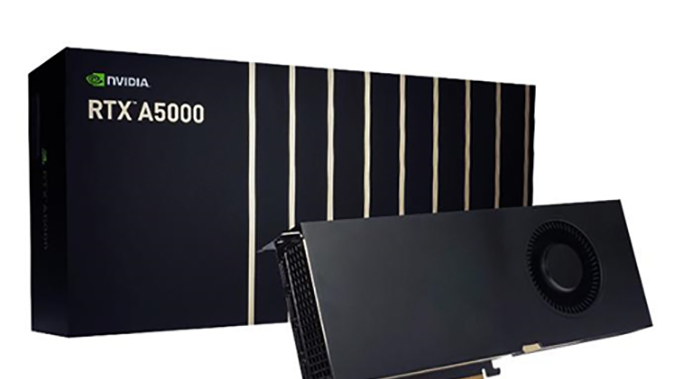
We at HOSTKEY have recently updated the GPU cards we use in our dedicated servers. In place of the old GTX10 series and the limited supply of the RTX30 series, we have chosen the next generation RTX A4000 and A5000 for GPU servers.
All new NVIDIA GPUs are built on the latest Ampere architecture.
Ampere uses Samsung's 8nm process technology and supports high-speed GDDR6, HBM2 and GDDR6X memory. GDDR6X memory is the sixth generation of DDR SDRAM memory and can reach speeds of up to 21 Gbps. In the A5000 and A4000, Nvidia uses 2nd generation RT cores and 3rd generation Tensor cores to deliver up to 2x the performance of the older Turing cores. GPU cards use the PCIe Gen 4 standard, which removes bottlenecks when communicating with the GPU.
Ampere uses a new version of CUDA 8+. There are now two FP32 streaming multiprocessors on the chip, giving FP32 performance gains over Turing-based cards. Older GPUs A5000 and above support NVLink 3.0 for pairing cards, which leads to a many-times increase in performance.
NVIDIA RTX A4000 and RTX A5000 graphics cards were released in April, 2021.
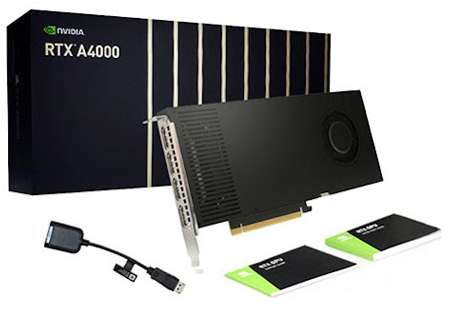
The new cards have much more memory; this allows you to efficiently work with neural networks and images.
Another significant difference between the RTX A4000 and RTX A5000 is hardware accelerated motion blur, which can significantly reduce rendering time and costs.
Older RTX A5000 cards support vGPU - NVIDIA RTX vWS, which allows multiple users to share computing resources and virtual GPUs.
On average, the new NVIDIA video cards outperform the old Quadro line by 1.5-2 times and consume less electricity.
Rent servers equipped with RTX A5000 / A4000 GPU
Testing RTX A5000 and RTX A4000 cards by HOSTKEY
We conducted our own testing of the NVIDIA RTX A5000 and A4000 professional graphics cards and compared them with the RTX 3090 and Quadro RTX 4000, representing the previous generation of professional graphics cards from NVIDIA.
Description of the test environment:
-
Processor: OctaCore Intel Xeon E-2288G, 3,5 GHz
-
32 GB DDR4-3200 ECC DDR4 SDRAM 1600 MHz
-
Samsung SSD 980 PRO 1TB (1000 GB, PCI-E 4.0 x4)
-
Server motherboard: Asus P11C-I Series (1 PCI-E x16, 1 M.2, 2 DDR4 DIMM, 2x Gigabit LAN + IPMI)
-
Microsoft Windows 10 Professional (64-bit)
Test results
-
V-Ray GPU RTX Test
-
-
V-Ray GPU CUDA Test
-
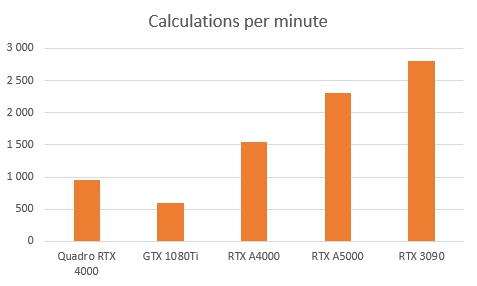
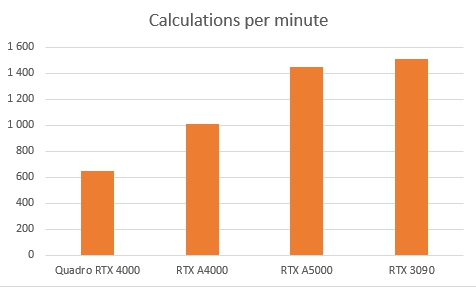
The V-Ray GPU CUDA and RTX benchmarks measure the relative rendering performance of a GPU. The RTX A4000 and RTX A5000 GPUs significantly outperform the Quadro RTX 4000 and GeForce GTX 1080 Ti GPUs (the V-Ray GPU RTX test cannot be performed on this card because it does not support RTX technology), but they are inferior to the RTX 3090, which is shown by the high memory bandwidth (936.2 GB/s versus 768.0 GB/s for the RTX A5000) and the number of stream processors (10,496 versus 8,192 for the RTX A5000).
“Dogs versus Cats”
To compare GPU performance for neural networks, we use the Dogs vs. Cats dataset. The test analyzes the contents of a photo and distinguishes between a cat and a dog in the photo. All the necessary initial data is here. We ran this test on different GPUs and different cloud services and got the following results:
Full training cycle
-
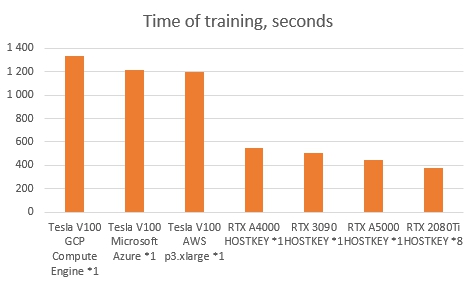
* - numbers of cards
The full training cycle of the test neural network took from 5 to 30 minutes. The NVIDIA RTX A5000 and A4000 result was 07m30s and 9m10s respectively. Only a GPU server with 8 GeForce RTX 2080Ti cards and an electricity consumption of approximately 2 kW/h worked faster than the single NVIDIA RTX A5000 and A4000. The previous generation Tesla V100 graphics cards are available on Google Cloud Compute Engine, Microsoft Azure and Amazon Web Services and performed the best of the cards tested.
How much does it cost to train a neural network on the different platforms?
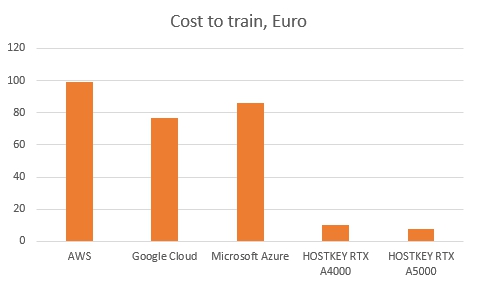
The graph shows the cost of training a model using the different services for the following configurations:
-
AWS — AWS p3.2xlarge
-
Google Cloud — GCP Compute Engine
-
Microsoft Azure — Tesla V100
-
HOSTKEY — RTX A4000, RTX A5000
At the moment, we provide GPU servers on a monthly basis only, but in the near future all of these machines will be available for rent on an hourly basis with a fully automated ordering and delivery system when ordering through the API.
Conclusions
The new professional graphics cards NVIDIA RTX A5000 and A4000 are the optimal solution for use in GPU servers, and they allow you to perform complex calculations and fast processing of large amounts of data.
The transition to the new Ampere architecture has significantly increased the performance of the new professional video cards from NVIDIA. Improved Tensor and RT cores significantly improve the quality and capabilities of real-time ray tracing. The memory capacity of 16 GB for the NVIDIA RTX A4000 and 24 GB for the RTX A5000 allows you to handle large amounts of data. The NVLink Bridge for A5000 combines two cards into one, allowing you to work with 48GB of high-performance memory.
Our NVIDIA Professional GPU Drivers are fully licensed in no way restricting their use in data centers, unlike gaming versions.
HOSTKEY recommends using modern dedicated and virtual GPU servers for (3D) scene rendering, video transcoding, training neural networks and data processing with already trained networks. If there is a stable large amount of data for processing, renting dedicated GPU servers can increase the processing speed by an order of magnitude for the same money or save significant financial resources on infrastructure.